
Improving Next.js Page Transitions for a smoother UX
Improve your Next.js app's navigation flow using loading.tsx and React Suspense. Make page transitions feel faster and more user-friendly with simple, built-in tools.
Introduction
If you've ever built a single-page application using React, you're probably used to instant page transitions. When you navigate to a new route, the page renders immediately, showing static content first while dynamic data loads in the background. Each component can easily manage its own loading state, making the experience feel fast and responsive.
Page transitions play a key role in how users perceive performance. A well-handled transition signals that something is happening, the app is responding even if data still needs to load. This feedback keeps users engaged and makes the overall experience feel smoother.
In Next.js, however, default page transitions can feel slow, especially when working with server components. When you click a link, the current page stays visible until the new one is fully rendered. This can leave users staring at stale content with no indication that navigation is in progress. The problem becomes even more noticeable on pages that depend on multiple API calls or heavy data fetching.
Example of an Admin Dashboard with Default Page Transitions
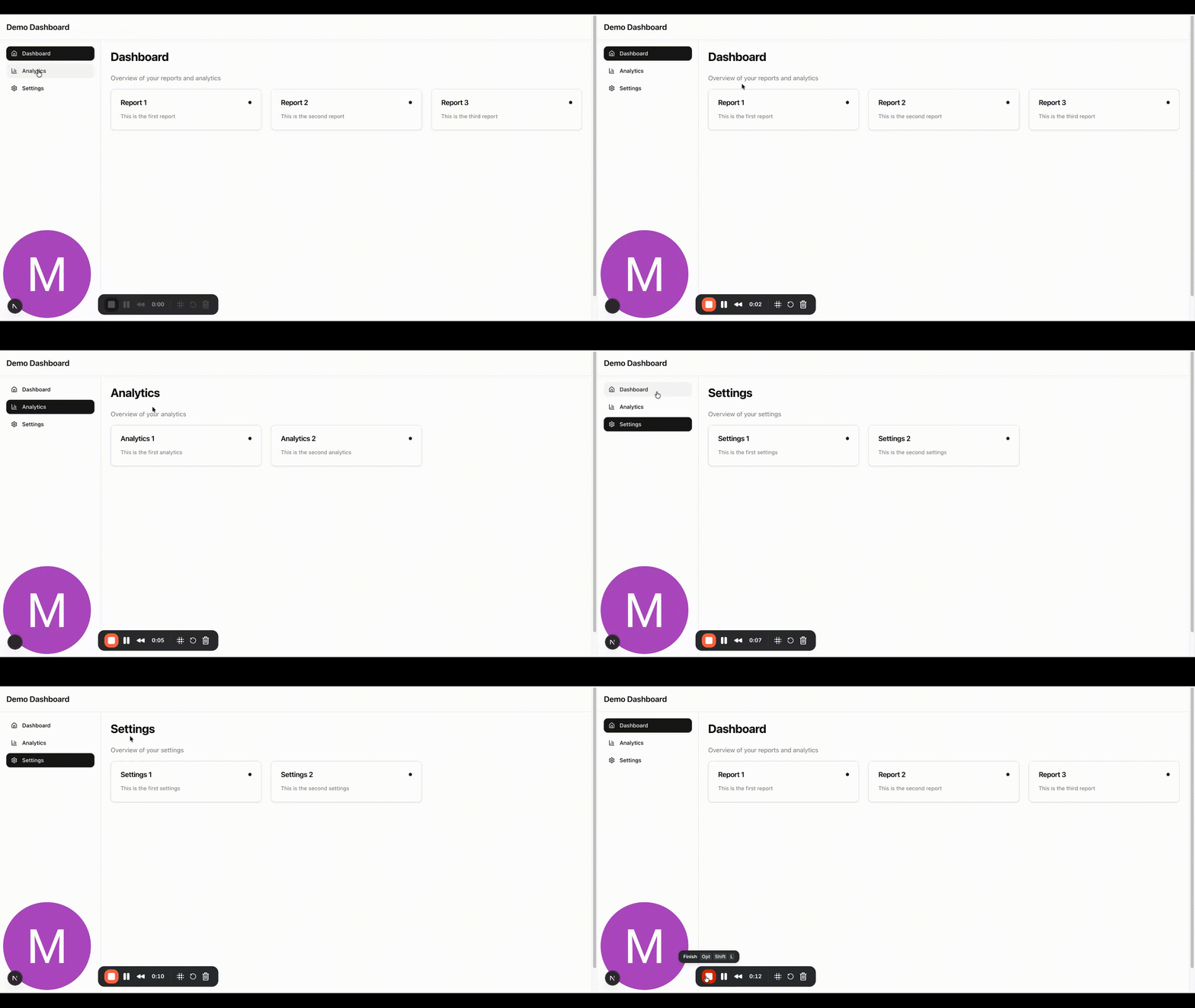
In the example below, we have a simple admin dashboard with a sidebar and a main content area. When you click on a link in the sidebar, a new page is rendered on the server and displayed to the user. Each page includes a simulated 3-second API call to mimic a slow data fetch.
With the default Next.js setup, when the user clicks a link, the previous page remains visible until the new page finishes rendering. This behavior can feel unresponsive because there's no visual indication that navigation is in progress. The user ends up waiting without feedback, which leads to a poor experience, especially when page loads take longer.
Adding a Loading State to Page Transitions
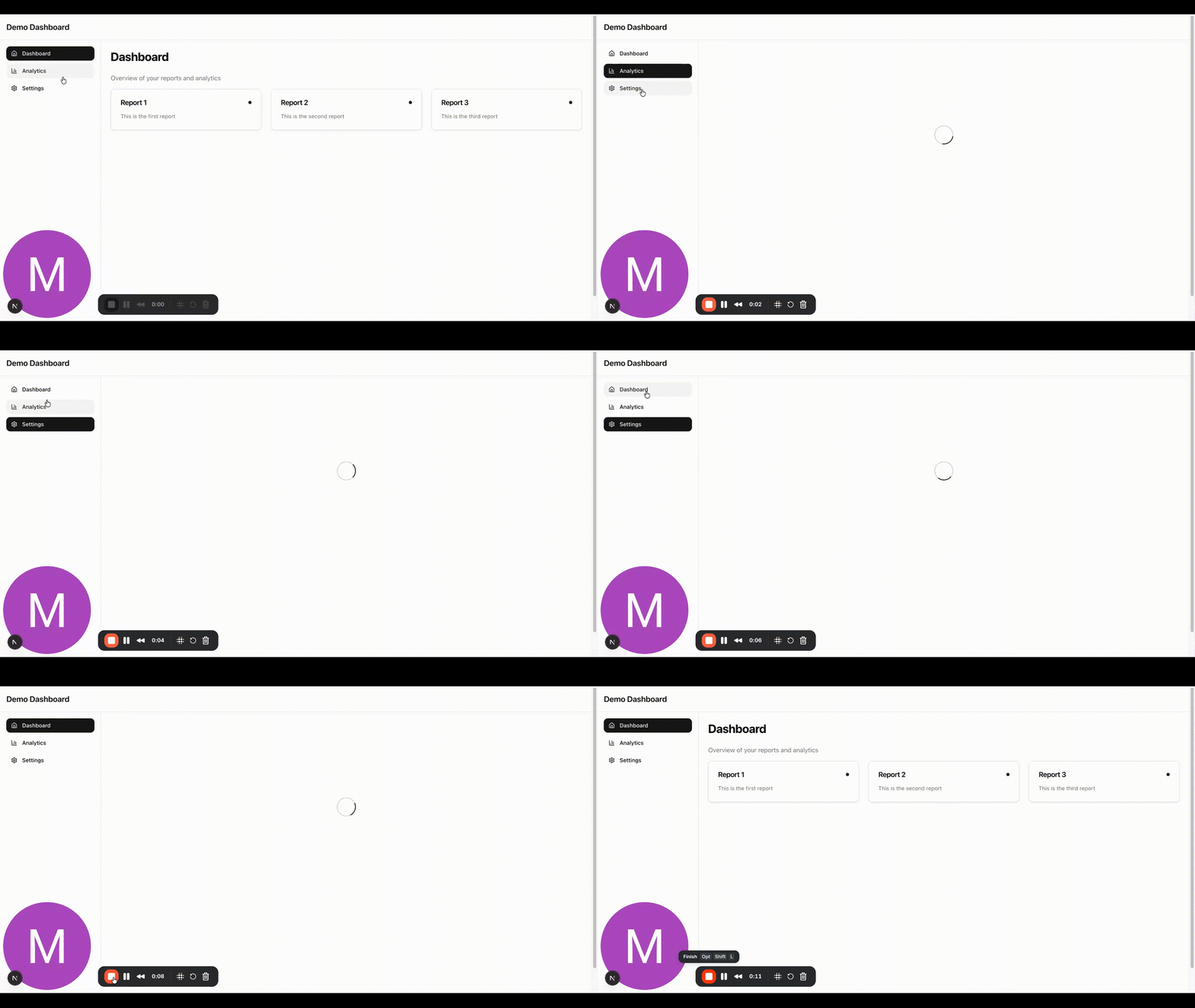
Next.js 15 makes it easy to add a loading state during page transitions using a loading.tsx file. The location of this file is important as it determines which pages it applies to. For example, if we create a loading.tsx file inside the app/admin directory, it will automatically be used for all pages within that directory.
When a user clicks a link in the sidebar, the loading.tsx component temporarily replaces the children of the layout.tsx file. This means the loader will appear in the main content area while the new page is being fetched and rendered on the server.
// app/admin/layout.tsx
import { Sidebar } from '@/components/ui/sidebar';

export default function AdminLayout({
  children,
}: Readonly<{
  children: React.ReactNode;
}>) {
  return (
    <div className="bg-background min-h-screen">
      <header className="bg-card/80 sticky top-0 z-50 w-full border-b backdrop-blur-sm">
        <div className="flex h-16 items-center px-4">
          <div className="flex items-center space-x-4">
            <h1 className="text-foreground text-xl font-semibold">
              Demo Dashboard
            </h1>
          </div>
        </div>
      </header>

      <div className="flex">
        <Sidebar />

        <main className="flex-1 overflow-auto">
          <div className="container mx-auto p-6">{children}</div>
        </main>
      </div>
    </div>
  );
}

// app/admin/loading.tsx
import { Spinner } from '@/components/ui/spinner';

export default function Loading() {
  return (
    <div className="flex items-center justify-center py-48">
      <div className="flex flex-col items-center space-y-4">
        <Spinner size="lg" />
      </div>
    </div>
  );
}
If you want a custom loading state for a specific page, you can add a separate loading.tsx file inside that page's directory. This setup gives you flexibility as you can have a shared loader for an entire section or unique loaders for individual pages.
In our example, we'll use a simple spinner component in loading.tsx to indicate that the page is loading. With just this small addition, we've introduced a smooth and consistent loading state for page transitions in our Next.js app.
Improving Page Transitions with Suspense
In single-page applications, static parts of the page are rendered immediately, while dynamic parts load asynchronously. This approach lets users see the main layout or static content right away, with dynamic data filling in as it becomes available.
We can achieve similar behavior in Next.js by using React Suspense. By wrapping dynamic parts of a page in a Suspense component, Next.js will render the static sections immediately and load the dynamic content in the background. This helps maintain a responsive feel even when data fetching takes time.
In our example, we can create a new component called DashboardReports that handles data fetching and renders the reports. By wrapping DashboardReports inside a Suspense boundary, the static parts of the dashboard will appear instantly, while the reports load asynchronously in the background, improving both perceived performance and user experience.
export async function DashboardReports() {
  const data = await getAnalytics();

  return (
    <div className="mt-4 grid gap-6 md:grid-cols-2 lg:grid-cols-3">
      {data.map(report => (
        <Card
          key={report.id}
          title={report.title}
          description={report.description}
        />
      ))}
    </div>
  );
}
Then in the dashboard page, we can wrap the DashboardReports component in a Suspense component:
<div>
  <div className="space-y-6">
    <h1 className="text-3xl font-bold tracking-tight">Dashboard</h1>
    <p className="text-muted-foreground">
      Overview of your reports and analytics
    </p>
  </div>

  <Suspense fallback={<Loading />}>
    <DashboardReports />
  </Suspense>
</div>

How Params and Suspense Work Together in Page Transitions
In Next.js, even if a page is dynamic because it uses params or searchParams, it can still render quickly for the user. That's because the router provides these values immediately so any content that depends on them (like a page header or a small identifier) can appear almost instantly.
At the same time, components that fetch additional data asynchronously, for example a report or chart, can be wrapped in a Suspense boundary. Suspense lets these components load in the background while showing a loader, without blocking the rest of the page.
The result is a hybrid experience: the user sees the static or quickly available content immediately, while dynamic content streams in as it becomes ready. This approach improves perceived performance and keeps page transitions smooth, even for data-heavy pages.
For example, suppose you create a page route that uses a param to display its value in the header. You can wrap the dynamic section in a Suspense component with a loader as the fallback. The static parts of the page (like the layout and header) will render immediately, while the dynamic content loads in the background and shows the loader in the meantime.
import { AnalyticsReport } from '@/components/features/AnalyticsReport';
import { Loading } from '@/components/ui/loading';
import { Suspense } from 'react';

export default async function AnalyticsReportPage({
  params,
  searchParams,
}: {
  params: Promise<{ id: string }>;
  searchParams: Promise<{ [key: string]: string | string[] | undefined }>;
}) {
  const { id } = await params;
  const { reportId } = await searchParams;
  return (
    <div>
      <div className="space-y-6">
        <h1 className="text-3xl font-bold tracking-tight">Analytics</h1>
        <p className="text-muted-foreground">Overview of your analytics</p>
      </div>

      <div>
        Analytics Report {id} - {reportId || 'No report ID'}
      </div>

      <Suspense fallback={<Loading />}>
        <AnalyticsReport />
      </Suspense>
    </div>
  );
}