
How to Reduce Vercel Costs by Optimizing Your Next.js App
Learn how to cut Vercel costs in your Next.js app with smart optimizations. From image handling to static pages, caching, and spend management, these strategies keep performance high while lowering your bill.
Introduction
Vercel is an excellent platform for deploying Next.js applications, it's fast, scalable, and easy to use. But if you're not careful, your costs can add up quickly. Features like automatic image optimization, server-side rendering, and background tasks are powerful, yet they can become expensive when used without limits or monitoring.
In this article, we'll break down the most common areas where Vercel bills grow unexpectedly and share practical tips to optimize your app, reduce compute costs, and stay in control of your spending.
Image Optimization
Next.js includes a built-in image optimization feature that automatically compresses and resizes images for the space they're displayed in. This improves page speed and user experience by serving smaller, optimized images on demand.
However, these optimizations aren't free. Vercel includes a limited number of image optimizations per month (based on your plan), and once you exceed that, you'll pay per 1,000 additional optimizations (see pricing). The good news is that Vercel caches optimized images after the first request, so repeat views don't keep adding to your bill.
To keep costs under control:
- Avoid large files in
/publicfolder. Hosting images larger than a few hundred kilobytes in yourpublicfolder means they'll be served directly via Vercel's CDN, which can quickly drive up bandwidth usage. - Monitor usage at scale. If your app serves many images, you might hit Vercel's limits quickly. In these cases, compare costs with third-party services like Cloudinary or ImageKit, which are designed for high-volume image hosting and optimization.
- Lock down external image sources. Without constraints, bad actors could abuse your optimizer to process arbitrary images, driving up costs. In your
next.config.ts, always whitelist specific image hosts and pathnames you control:
// next.config.ts
import type { NextConfig } from 'next';

const nextConfig: NextConfig = {
  images: {
    remotePatterns: [
      {
        protocol: 'https',
        hostname: 'your-image-host.com',
        port: '',
        pathname: '/your-unique-pathname/**',
        search: '',
      },
    ],
  },
};
This ensures only images from https://your-image-host.com/your-unique-pathname/ are optimized. Requests outside this pattern will be blocked with a 400 Bad Request, protecting both your app and your bill.
Videos
Videos are among the most bandwidth-heavy assets you can serve. If you place them in your Next.js public folder, Vercel will deliver them through its CDN. This may seem convenient, but even a few large video files can quickly drive up your bandwidth usage and your monthly bill.
A better approach is to use a dedicated video hosting or storage service:
- Cloudflare R2 or AWS S3 + CloudFront - great for cost-effective storage and scalable delivery.
- Specialized video platforms (YouTube, Vimeo etc.) - optimized for streaming, adaptive playback, and global delivery.
This way, you offload video bandwidth to platforms designed for it, while keeping your Vercel costs predictable and under control.
Database queries and API calls
Every millisecond your serverless function spends waiting is billed. If you run database queries or API calls sequentially, you're paying for the idle time between each request.
Run Queries Concurrently
Whenever possible, run requests in parallel. In the example below, instead of fetching the comments only after retrieving the post, you can run post and comments queries concurrently and then await the results:
export async function GET(request: Request) {
  const post = await db.select().from(postsTable).where(eq(postsTable.id, id));

  const comments = await db
    .select()
    .from(commentsTable)
    .where(eq(commentsTable.postId, post.id));

  const author = await db
    .select()
    .from(usersTable)
    .where(eq(usersTable.id, post.authorId));

  return NextResponse.json({ post, comments, author });
}
An even better solution is to fetch related data in a single optimized query if your database supports it (e.g., joins).
Use Caching to Cut Costs
Caching frequently accessed data that doesn't change often both reduces compute time and improves user experience. When data updates (e.g., a new comment), you can trigger cache invalidation with revalidateTag("post") or revalidateTag("comments").
const cachedPost = cache(() => {
  return db.select().from(postsTable).where(eq(postsTable.id, id));
}, ['post']);

const cachedComments = cache(() => {
  return db.select().from(commentsTable).where(eq(commentsTable.postId, id));
}, ['comments']);

const cachedAuthor = cache(() => {
  return db.select().from(usersTable).where(eq(usersTable.id, post.authorId));
}, ['author']);
Consider Fluid Compute for Long Requests
For long-running operations like LLM calls or heavy third-party API requests, Vercel's Fluid Compute can help lower costs. Still, it's best to first optimize your queries and caching strategy as these improvements usually save money and speed up your app.
Static Pages
Not every page needs to be dynamic. Content like Privacy Policy, Terms & Conditions, or any other page without user-specific data should be statically generated in Next.js.
If these pages are server-rendered instead, every visit triggers server computation which means higher Vercel costs and slower response times.
Common Gotcha: Accidentally Making a Page Dynamic
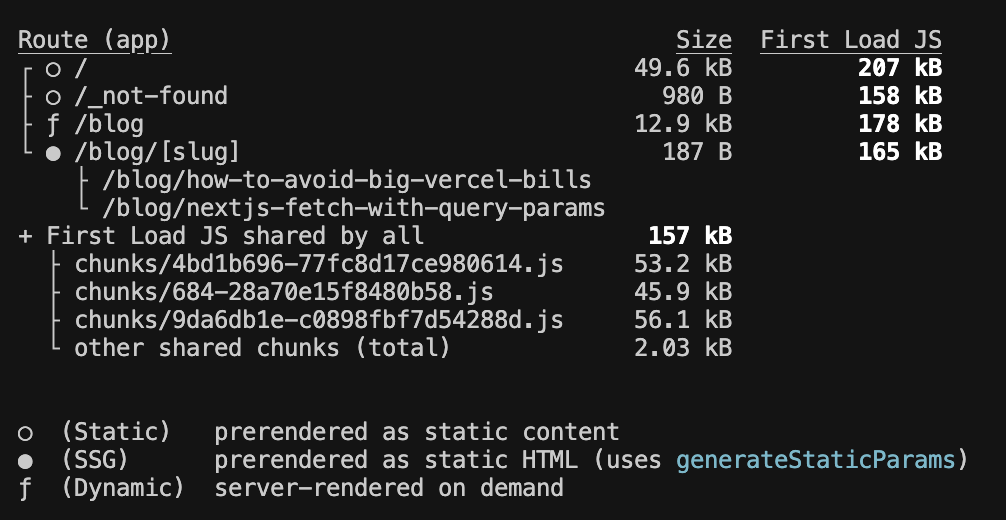
Accessing cookies, headers, or search parameters inside a page forces Next.js to mark it as dynamic. That removes the benefits of static generation.
During the build process, Next.js tells you how each page is rendered. Make sure critical static pages show up as static instead of dynamic. Look for output like:
Vercel Analytics
Vercel Analytics gives useful insights into app performance and user behavior but it doesn't scale cheaply. The free tier is limited, and as your traffic grows, the per-event pricing can lead to painful bills. For small projects/prototypes, Vercel Analytics is fine, but for high traffic applications, it's worth switching to a more cost-effective alternative.
Most alternatives like Posthog offer:
- More generous free tiers (e.g., PostHog: 1M events/month).
- Lower per-event costs at scale.
- Better cost predictability.
- Advanced features like funnels, retention, and segmentation.
If analytics is important to your business, moving early to a dedicated provider avoids painful migrations later.
Spend Management
Even well-optimized apps can rack up unexpected bills from traffic spikes, DDoS attacks, or abuse. Protect yourself by putting guardrails in place.
Protection Strategies:
- Set spend limits: Configure max monthly thresholds in Vercel.
- Enable notifications: Get alerts when approaching limits (e.g., at 80% and 95%).
- Monitor usage patterns: Track unusual traffic spikes or request patterns.
- Implement rate limiting: Stop abuse before it hits your infra (middleware, API routes, or edge functions).
These steps ensure that a sudden traffic surge doesn't turn into a financial nightmare.
Conclusion
Building cost-effective applications on Vercel comes down to understanding how Next.js features impact your bill and making smart trade-offs.
Key Takeaways:
- Optimize images and media: Use external services when working with large number of images.
- Use static generation: Make sure your pages are statically generated when possible.
- Run database queries and API calls concurrently: Avoid sequential database/API calls that waste compute time.
- Cache smartly: Cache frequently accessed data and revalidate when necessary.
- Monitor and limit spending: Set alerts, limits, and rate limiting to prevent surprise bills.
- Choose cost-effective alternatives: Consider third-party services for analytics and media hosting.
Performance = Cost Savings: Remember that performance optimizations directly translate to cost savings. A faster application not only provides better user experience but also reduces serverless function execution time and bandwidth usage. Keep your codebase simple, understand your application's performance characteristics, and continuously monitor your usage patterns.
By following these best practices, you can build scalable applications that deliver excellent performance without breaking the bank.